
The files on your OneDrive are private until you share them. Keep in mind that when you share folders with Edit permissions, people you share with can add the shared folders to their own OneDrive. This lets them keep the folder alongside their own folders and items, easily move items between folders, and more easily work on it offline. Any updates they make sync with the shared folder, so everyone with access to the folder is up to date.
Tips:
-
The recipient can add shared folders to their OneDrive, not individual files. If you want the recipient to add files to their OneDrive, put the files in a folder first, and then share the folder.
-
To share files on SharePoint, check out Share SharePoint files or folders or Share documents or folders in SharePoint Server.
Choose this option to share items with lots of people you might not even know personally. For example, you can use these links to post to Facebook, Twitter, or LinkedIn, or share in an email or message. Anyone who gets the link can view or edit the item, depending on the permission you set. Users with the link cannot upload new items. If the sharing link points to a folder, you may be required to sign in with a Microsoft account. Don't have one?
Tip: You can generate sharing links through the OneDrive desktop app for Windows 7, Windows 10, Windows 11, and Mac. Just right-click the file or folder in your OneDrive folder on your computer and select Share a OneDrive link. This will copy a link to your clipboard that you can paste wherever you want to send it. However, these links are set by default to Edit permission. If you want to change the permissions, follow the steps below.
-
Go to the OneDrive website and sign in with your Microsoft account or your work or school account.
-
Pick the files or folders you want to share by selecting its circle icon.
Note: Sharing multiple items at the same time is not available for OneDrive for work or school accounts.
-
If you're using List view, select the circle on the left side of the item. You can also pick multiple items to share them together.
-
If you're using Tiles view, select the circle in the top right corner of the item. You can also pick multiple items to share them together.
-
-
Select Share


Notes:
-
If the selected file or folder is shared with someone already, there is a Shared with list at the bottom. Each image is either the profile photo of an individual or the initials of a group that the file has been shared with. If you want to edit the access level for an individual or group, select a photo or group initials to open Manage Access.
-
If the selected file or folder isn't currently shared with someone, there won't be a Shared with list.
-
-
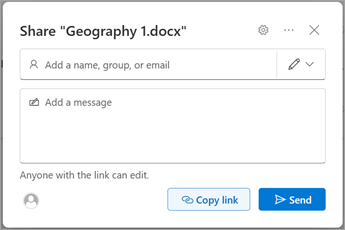
Select Copy Link to copy the link.
Note: Depending on settings set by your administrator, you may have different default settings. For example, this button could also say People in <Your Organization> can edit.
-
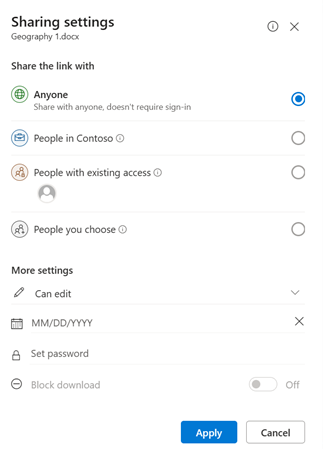
To change the link permissions, select settings:
Note: If a sharing option has been greyed out, your organization's admins may have restricted them. For example, they may choose to disable the Anyone option to prevent usable links being forwarded to others outside your organization.
-
Anyone gives access to anyone who receives this link, whether they receive it directly from you or forwarded from someone else. This may include people outside of your organization.
-
People in <Your Organization> with the link gives anyone in your organization who has the link access to the file, whether they receive it directly from you or forwarded from someone else.
-
People with existing access can be used by people who already have access to the document or folder. It does not change any permissions. Use this if you just want to send a link to somebody who already has access.
-
Specific people gives access only to the people you specify, although other people may already have access. If people forward the sharing invitation, only people who already have access to the item will be able to use the link.
Note: When sharing to a security or Microsoft 365 group with a "People in <Your Organization>" link, recipients must click on the link before they can access the item.
-
-
Under Other settings, you can set any of the following options:
-
Allow editing lets people who are signed in with a Microsoft Account edit the files or folders they have access to. If you're sharing a folder, people with Edit permissions can copy, move, edit, rename, share, and delete anything in the folder they have access to. Unchecking this box means that people can view, copy, or download your items without signing in. They can also forward the link to other people. However, they cannot make changes to the version on your OneDrive.
Notes:
-
Allow editing is turned on by default.
-
You can also set editing permissions on the previous screen by selecting the pencil icon to the right of the names you're sharing the file with.
-
-
Block download prevents people from downloading the file or folders they have access to. Unchecking this box means that people can download the files onto their devices.
-
Set expiration date lets you set a date for the link to expire. After the date you set, the link won't work anymore and you will need to create a new link for users requiring access to your file or folder.
Note: Only available to Microsoft 365 subscribers.
-
Set password letsyou set a password to access the file. When a user clicks the link, they will be prompted to enter a password before they can access the file. You'll need to provide this password separately to anyone you want to share the file with.
Note: Only available to Microsoft 365 subscribers.
-
Open in review mode only limits people to leaving comments and making suggestions on the file.
Notes:
-
Only Word documents / files have this permission option.
-
If someone already has editing permissions for the document, selecting Open in review mode only will not prevent them from making edits. For them, the document will open in edit mode.
-
-
-
Once you have set all your link settings and permissions, select Apply.
-
Select Copy and then select Send.
Note: "https://1drv.ms” is the shortened URL for OneDrive. Shortened URLs are useful for sharing via Twitter.
-
Paste the link and send the link where you want to send it, like an email, message, or post.
Tip: Photo story is a new part of OneDrive that makes it easier to share photos and videos with friends and family. Learn more.
Choose this option if you want to send an email invitation to people or groups and keep track of who you invited. This also lets you remove permission for specific individuals or groups later if you need to.
-
Go to the OneDrive website and sign in with your Microsoft account or your work or school account.
-
Pick the files or folders you want to share by selecting its circle icon.
Note: Sharing multiple items at the same time is not available for OneDrive for work or school accounts.
-
If you're using List view, select the circle on the left side of the item. You can also pick multiple items to share them together.
-
If you're using Tiles view, select the circle in the top right corner of the item. You can also pick multiple items to share them together.
-
-
Select Share
Notes:
-
If the selected file or folder is shared with someone already, there is a Shared with list at the bottom. Each image is either the profile photo of an individual or the initials of a group that the file has been shared with. If you want to edit the access level for an individual or group, select a photo or group initials to open Manage Access.
-
If the selected file or folder isn't currently shared with someone, there won't be a Shared with list.
-
-
Select settings to open the link settings.
Note: Depending on settings set by your administrator, you may have different default settings. For example, this button could also say People in <Your Organization> can edit.
-
If you're using OneDrive for work or school, you can change the link permissions. Otherwise, skip this step.
-
Select an option for who you want to give access to with the link:
Note: If a sharing option has been greyed out, your organization's admins may have restricted them. For example, they may choose to disable the Anyone option to prevent usable links being forwarded to others outside your organization.
-
Anyone gives access to anyone who receives this link, whether they receive it directly from you or forwarded from someone else. This may include people outside of your organization.
-
People in <Your Organization> with the link gives anyone in your organization who has the link access to the file, whether they receive it directly from you or forwarded from someone else.
-
People with existing access can be used by people who already have access to the document or folder. It does not change any permissions. Use this if you just want to send a link to somebody who already has access.
-
Specific people gives access only to the people you specify, although other people may already have access. If people forward the sharing invitation, only people who already have access to the item will be able to use the link.
Note: To track access and ensure security, you can only share with someone who is in your organization or has a Microsoft Account.
-
-
-
Under More settings, you can set any of the following options:
-
Allow editing lets people who are signed in with a Microsoft Account edit the files or folders they have access to. If you're sharing a folder, people with Edit permissions can copy, move, edit, rename, share, and delete anything in the folder they have access to. Unchecking this box means that people can view, copy, or download your items without signing in. They can also forward the link to other people. However, they cannot make changes to the version on your OneDrive.
Notes:
-
Allow editing is turned on by default.
-
You can also set editing permissions on the previous screen. Under Send link, next to the Name, group or email field, select the pencil icon to change the editing permissions for the people or groups you have entered.
-
-
Block download prevents people from downloading the file or folders they have access to. Unchecking this box means that people can download the files onto their devices.
Note: This option is only available for work or school accounts and if you don't allow editing.
-
Set expiration date lets you set a date for the link to expire. After the date you set, the link won't work anymore and you will need to create a new link for users requiring access to your file or folder.
Note: Only available to Microsoft 365 subscribers.
-
Set password letsyou set a password to access the file. When a user clicks the link, they will be prompted to enter a password before they can access the file. You'll need to provide this password separately to anyone you want to share the file with.
Note: Only available to Microsoft 365 subscribers.
-
Open in review mode only limits people to leaving comments and making suggestions on the file.
Notes:
-
Only Word documents and files have this permission option.
-
If someone already has editing permissions for the document, selecting Open in review mode only will not prevent them from making edits. For them, the document will open in edit mode.
-
-
-
Once you have set all your link settings and permissions, select Apply.
-
In the Name, group or email field, start typing the email addresses or contact names of people you want to share with. When you begin to enter info in the box, you can also choose a contact from the list that appears.
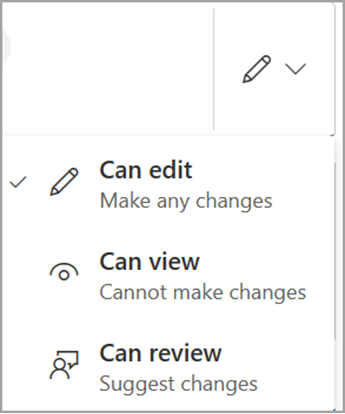
Tip: To quickly share with specific people, you can type in their name or email and then use the pencil icon to the right of the Name, group or email field to select Can edit or Can view. Then follow the same steps below to share with the specific people you listed. For Word documents, you can use the Can review option to let someone add comments and suggestions but prevent them from making edits.
-
Include a message below the Name, group or email field, if you want.
Note: If you want to compose your message in Outlook, select the Outlook button and the link will be inserted into a draft email and everyone you entered to share with will be in the To list.
-
Select Send.
Notes:
-
If you have trouble sharing from Outlook.com, see Can't share OneDrive files from Outlook.com.
-
If your Microsoft account is set with Family Safety, and your parent has turned off contact management, you can only share items with people who are already on your contact list.
-
Please respect copyright and be careful what you share online. Copying or sharing unauthorized materials violates the Microsoft Services Agreement.
Sharing with the OneDrive mobile apps
For information and help, see:
Learn more
Need more help?
|
|
Contact Support
For technical support, go to Contact Microsoft Support, enter your problem and select Get Help. If you still need help, select Contact Support to be routed to the best support option. |
|
|
|
Admins
|








