
Phishing and suspicious behavior
A phishing email is an email that appears legitimate but is actually an attempt to get your personal information or steal your money. Some deceptive emails appear to be from a safe sender but, in fact, have a "spoofed" source address to fool you. Here are some ways to deal with phishing and spoofing scams in Outlook.com.
Spoof Intelligence from Microsoft 365 Advanced Threat Protection and Exchange Online Protection help prevent phishing messages from reaching your Outlook inbox. Outlook verifies that the sender is who they say they are and marks malicious messages as junk email. If the message is suspicious but isn't deemed malicious, the sender will be marked as unverified to notify the receiver that the sender may not be who they appear to be.
Here are some of the most common types of phishing scams:
-
Emails that promise a reward, such as “Click this link to get your tax refund!”
-
A document that appears to come from a friend, bank, or other reputable organization. The message is something like “Your document is hosted by an online storage provider and you need to enter your email address and password to open it.”
-
An invoice from an online retailer or supplier for a purchase or order that you did not make. The attachment appears to be a protected or locked document, and you need to enter your email address and password to open it.
-
Read more at Learn to spot a phishing email.
-
If you think someone has accessed your Outlook.com account, or you received a confirmation email for a password change you didn’t authorize, read My Outlook.com account has been hacked.
-
In the message list, select the message or messages you want to report.
-
Above the reading pane, select Junk > Phishing > Report to report the message sender.
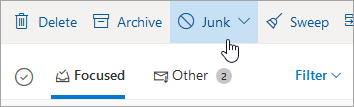
Note: When you mark a message as phishing. the sender is reported but is not blocked from sending you additional messages. To actually block a sender, add the sender to your blocked senders list. For more information, see Block senders or mark email as junk in Outlook.com.
Outlook shows indicators when the sender of a message is unverified, and either can't be identified through email authentication protocols or their identity is different from what you see in the From address.
-
You see a '?' in the sender image
When Outlook can't verify the identity of the sender by using its email authentication techniques, it displays a '?' in the sender photo.

-
Not every message that fails to authenticate is malicious. However, you should be careful about interacting with messages that don't authenticate, especially if you don't recognize the sender. Also, if you recognize a sender that normally doesn't have a '?' in the sender image, but you suddenly start seeing it, that could be a sign the sender is being spoofed (impersonated). You can learn more about Spoof Intelligence from Microsoft 365 Advanced Threat Protection and Exchange Online Protection in the Related topics below.
-
The sender's address is different than what appears in the From address
The email address you see in a message may be different than what you see in the From address. Sometimes phishers try to trick you into thinking that the sender is someone other than who they really are.
When Outlook detects a difference between the sender's actual address and the address on the From address, it shows the actual sender using the underlined via tag.
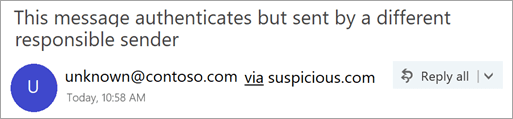
In this example, the sending domain "suspicious.com" is authenticated (not necessarily malicious), but the sender put "unknown@contoso.com" in the From address. Not every message with a via tag is suspicious. However, if you don't recognize a message with a via tag, you should be cautious about interacting with it.
In Outlook and the new Outlook on the web, you can hover your cursor over a sender's name or address in the message list to see their email address, without needing to open the message.
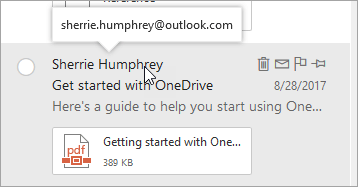
Note: This feature is only available if you sign in with a work or school account.
Help Microsoft stop false-tech-support scammers -- whether they claim to be from Microsoft or from another tech company. Report tech support scams at this link:
Related topics
Block senders or mark email as junk in Outlook.com
Advanced Outlook.com security for Microsoft 365 subscribers
Spoof settings in anti-phishing policies in Office 365
Receiving email from blocked senders in Outlook.com
Still need help?
|
|
To get support in Outlook.com, click here or select Help on the menu bar and enter your query. If the self-help doesn't solve your problem, scroll down to Still need help? and select Yes. To contact us in Outlook.com, you'll need to sign in. If you can't sign in, click here. |
|
|
|
For other help with your Microsoft account and subscriptions, visit Account & Billing Help. |
|
|
|
To get help and troubleshoot other Microsoft products and services, enter your problem here. |
|
|
|
Post questions, follow discussions and share your knowledge in the Outlook.com Community. |


Need more help?
Want more options?
Explore subscription benefits, browse training courses, learn how to secure your device, and more.




Communities help you ask and answer questions, give feedback, and hear from experts with rich knowledge.


