
Use the taskbar for more than seeing your apps and checking the time. You can personalize it in many ways—change the color, pin your favorite apps to it, and move or rearrange taskbar buttons. You can also check your battery status and minimize all open programs momentarily so that you can take a look at your desktop.
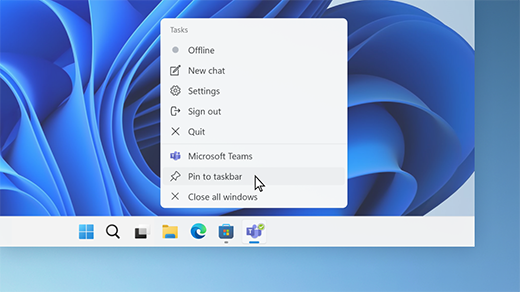
Pin an app to the taskbar
Pin an app directly to the taskbar for quick access when you're on the desktop. (Or unpin it, if you want.) You can do it from Start or the Jump List—which is a list of shortcuts to recently opened files, folders, and websites.
In the Search box on the taskbar, type the name of the app you want to pin to the taskbar. Press and hold (or right-click) on the app, then select Pin to taskbar .
To unpin an app, follow the same steps and select Unpin from taskbar .
If the app is already open, select and hold the icon in the taskbar (or right-click it), then select Pin to taskbar .
If you’re unpinning, follow the same steps and select Unpin from taskbar .
Change your taskbar settings
Customize the taskbar from the taskbar itself. If you want to change multiple aspects of the taskbar at one time, use Taskbar settings. Press and hold (or right-click) any empty space on the taskbar, and then select Taskbar settings.
In the Taskbar settings, scroll to see the options for customizing, choosing icons, and much more.
Note: The Taskbar settings allow you to align taskbar icons in the center or on the left—but there are no settings for moving a taskbar to the top or side of the screen. By default, the taskbar sits at the bottom of the screen.
Select any of the following to see more ways to customize your taskbar.
These are the buttons and bars that sit right next to your Start button and cannot be moved.
Search on the taskbar can be set in four ways: either to Search box, which includes a full text box to enter your search (or your Bing Chat prompt; see Using the new Bing on the Windows taskbar for more) into plus additional search highlights, Search icon and label (displaying as a search icon and Search label), Search icon only (just the icon) or Hide (completely hidden).
Note: The Search box setting is not supported when Automatically hide the taskbar is selected under Taskbar behaviors.
You can also set the Task view, Widgets, or Chat buttons On or Off.
Keep your system tray neat and tidy! In System tray icons, you can determine when the Pen menu, Touch keyboard, or Virtual touchpad icons are displayed. In Other system tray icons, you can turn icons that are mostly installed alongside other apps On (meaning they will display in the tray all of the time) or Off (meaning they will only show when they need your attention, and otherwise can be accessed in the Hidden icon menu, if you have that turned On.)
Typically, the taskbar icons are centered, but you can also align them to the side of the taskbar.
-
Press and hold (or right-click) any empty space on the taskbar, then select Taskbar settings > Taskbar behaviors.
-
Scroll to Taskbar alignment and select Left.
Whenever you want to change the order of app buttons on the taskbar, just drag a button from its current position to a different one.
A badge on a taskbar button is an alert to let you know that some activity is happening, or needs to happen, with that app.
For example, a bell badge on the Alarms & Clocks app alerts you to an active alarm that will notify you at the time you set. This feature is turned on by default, but if you want to make sure it’s on (or to turn it off), press and hold (or right-click) any empty space on the taskbar, select Taskbar settings, select Taskbar behaviors, and scroll to Show badges (unread messages counter) on taskbar apps.
Use the show desktop feature to take a quick look at what’s on your desktop behind all the open windows.
-
Press and hold (or right-click) any empty space on the taskbar, select Taskbar settings, select Taskbar behaviors, then choose Select the far corner of the taskbar to show the desktop.
Open Taskbar settings -
Move the mouse over, or press, the far-right edge of the taskbar to see the desktop.
-
To restore the view of all your open windows, move the mouse over, or press, the far-right edge of the desktop again.
You can hide the taskbar both in desktop mode and tablet mode. Press and hold (or right-click) any empty space on the taskbar, select Taskbar settings, select Taskbar behaviors, and select Automatically hide the taskbar.
To see the taskbar after it's hidden, hover your mouse over, or touch, the bottom edge of your screen.
-
Select Start > Settings > Personalization .
-
Select Colors and scroll to Accent color.
-
Turn on Show accent color on Start and taskbar. This will change the color of your taskbar to the color of your overall theme.
Note: This option is only available if you select Dark or Custom as your Windows color (under Choose your mode). If you choose Custom, you'll also need to choose Dark for Choose your default Windows mode.
Note: This setting is only available on 2-in-1 devices with tablet functionality.
When you disconnect or fold back the keyboard on your 2-in-1 device, you'll now see the tablet-optimized taskbar in the latest versions of Windows 11. This taskbar has two states: collapsed and expanded. In the collapsed state, the taskbar is minimized so you can focus on your task, but you can still see critical status icons like the time or battery level. When you need to use the taskbar, swipe up from the bottom to see the expanded state that has a touch-friendly design with larger icons. When you launch an app, the taskbar will automatically collapse again.
To turn the tablet-optimized taskbar on or off, do this:
-
Press and hold (or right-click) any empty space on the taskbar, select Taskbar settings, and then select Taskbar behaviors.
-
To turn off the tablet-optimized taskbar, uncheck the box next to Optimize taskbar for touch interactions when this device is used as a tablet. To turn it back on again, simply recheck the box.
You can show seconds alongside hours and minutes in your system tray clock on the taskbar. Press and hold (or right-click) any empty space on the taskbar, then select Taskbar settings > Taskbar behaviors, and then check Show seconds in system tray clock.
Use the taskbar for more than seeing your apps and checking the time. You can personalize it in many ways—change the color and size, pin your favorite apps to it, move it around on your screen, and rearrange or resize taskbar buttons. You can also check your battery status, minimize all open programs momentarily so that you can take a look at your desktop, lock the taskbar to keep your options, and customize your settings for search highlights, news and interests, and more.
Pin an app to the taskbar
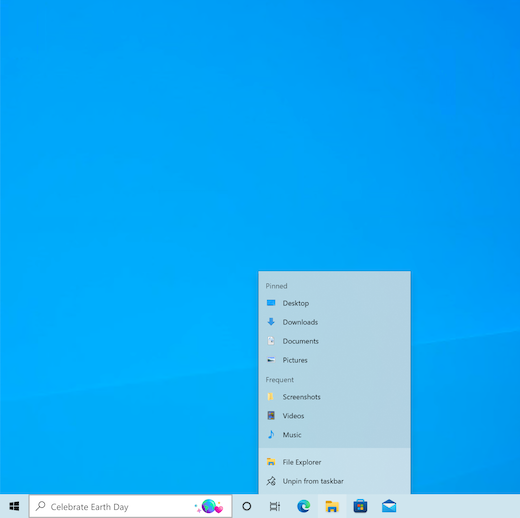
Pin an app directly to the taskbar for quick access when you're on the desktop. (Or unpin it, if you want.) You can do it from Start or the Jump List, which is a list of shortcuts to recently opened files, folders, and websites.
In the Search box on the taskbar, type the name of the app you want to pin to the taskbar. Press and hold (or right-click) on the app, then select Pin to taskbar .
To unpin an app, follow the same steps and select Unpin from taskbar .
If the app is already open, right-click or press and hold the app's icon on the taskbar, then select Pin to taskbar . Or select Unpin from taskbar if you're unpinning the app.
Change your taskbar settings
Customize the taskbar from the taskbar itself. If you want to change multiple aspects of the taskbar at one time, use Taskbar settings. Press and hold (or right-click) any empty space on the taskbar, and then select Taskbar settings .
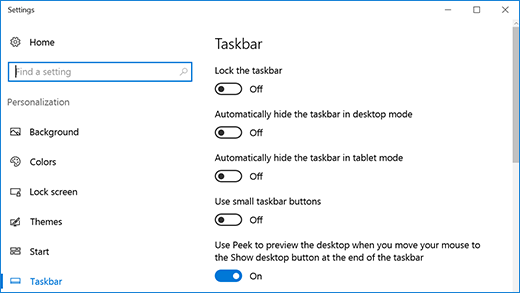
In the Taskbar settings, scroll to see the options for customizing, sizing, choosing icons, battery information and much more.
Select any of the following to see more info.
Locking the taskbar is handy to make sure it remains how you set it up. Unlock the taskbar later when you want to make changes or change its location on the desktop.
-
Press and hold (or right-click) any empty space on the taskbar.
-
Select Taskbar settings and turn on Lock the taskbar.
If Lock the taskbar has a check mark next to it, you know it’s already locked. To turn it off, under Lock the taskbar set the toggle to Off.
If you have multiple monitors that display the taskbar, you'll see Lock all taskbars.
Typically, the taskbar is at the bottom of the desktop, but you can also move it to either side or the top of the desktop. When the taskbar is unlocked, you can change its location. See the Lock and unlock the taskbar section to find out if yours is locked. When you've confirmed that your taskbar is unlocked, you can change its location.
-
Press and hold (or right-click) any empty space on the taskbar and select Taskbar settings .
-
Scroll down to Taskbar location on screen, and then select Left, Top, Right, or Bottom.
Like many other changes in the taskbar, you'll need to first unlock the taskbar. Then, move the pointer over the border of the taskbar until the pointer turns into a double arrow. Drag the border to the size you want and release.
You can add the battery icon to the taskbar.
-
Press and hold (or right-click) any empty space on the taskbar.
-
Select Taskbar settings , scroll down, and choose Select which icons appear on the taskbar.
-
Set the toggle for Power to On.
You can check battery status by selecting the battery icon in the taskbar.

Note: You might need to select the Show hidden icons icon on the taskbar before selecting the battery icon. Power is not an option on systems without a battery.
Whenever you want to change the order of app buttons on the taskbar, just drag a button from its current position to a different one. You might want to choose how taskbar buttons are grouped, especially if you have multiple windows open. By default, all open files from the same app are always grouped together, even if you didn’t open them in succession.
Change how taskbar buttons group together
-
Press and hold (or right-click) any empty space on the taskbar, then select Taskbar settings > Combine taskbar buttons.
-
Select from the list:
-
Always, hide labels. This is the default setting. Each app appears as a single, unlabeled button, even when multiple windows for that app are open.
-
When taskbar is full. This setting shows each window as an individual, labeled button. When the taskbar becomes crowded, apps with multiple open windows collapse into a single app button. Select the button to see a list of the windows that are open.
-
Never. This setting shows each window as an individual, labeled button and never combines them, no matter how many windows are open. As more apps and windows open, buttons get smaller, and eventually the buttons will scroll.
If you use multiple displays, you can make a different choice for your extra displays.
-
Select Taskbar settings .
-
Scroll down to Multiple Displays and select from the Combine taskbar buttons on other taskbars list.

If you want to show more of your apps on the taskbar, you can show smaller versions of the buttons.
-
Press and hold (or right-click) any empty space on the taskbar, select Taskbar settings , and then select On for Use small taskbar buttons.
-
Select Off to return to the larger taskbar buttons.
Note: Badges aren't displayed on small taskbar buttons.
A badge on a taskbar button is an alert to let you know that some activity is happening or needs to happen with that app. For example, a bell badge on the Alarms & Clocks app alerts you to an active alarm that will notify you at the time you set. This feature is turned on by default, but you can make sure it’s on (or turn it off).
-
Press and hold (or right-click) any empty space on the taskbar, and select Taskbar settings .
-
Scroll down to Show badges on taskbar buttons and set the toggle as desired.
Use the Peek feature to take a quick look at what’s on your desktop behind all the open windows.
-
Press and hold (or right-click) any empty space on the taskbar, select Taskbar settings , and then turn on Use Peek to preview the desktop when you move your mouse to the Show desktop button at the end of the taskbar.
Open Taskbar settings -
Move the mouse pointer over (or press and hold) the far-right edge of the taskbar to see the desktop.
-
To restore the view of all your open windows, move the pointer away or press and hold the edge one more time.
You can hide the taskbar based on whether you’re in desktop mode or tablet mode.
-
Press and hold (or right-click) any empty space on the taskbar, and select Taskbar settings .
-
Turn on either Automatically hide the taskbar in desktop mode or Automatically hide the taskbar in tablet mode (or both).
Change the color of your taskbar
-
Select Start > Settings > Personalization .
-
Select Colors and scroll down to Show accent color on the following surfaces.
-
Select Start, taskbar, and action center. This will change the color of your taskbar to the color of your overall theme.









