
Microsoft 365 for the web lets you view and edit documents stored in your OneDrive directly from your web browser. Microsoft 365 for the web gives you the full functionality of editing without having to start up an Office program. And you use it with any device that’s connected to the Web.
To get started, go to OneDrive.com, sign in, and click Upload. Pick documents that you want to be able to share easily, or be able to access on any computer.
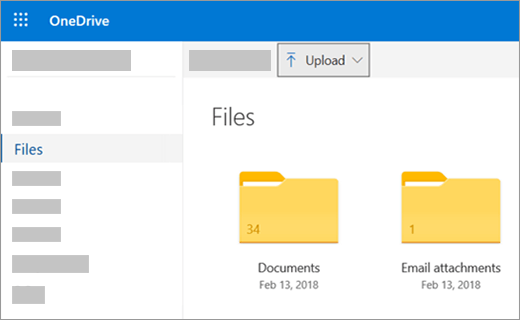
When you can see the document on OneDrive, click it. It opens in an Microsoft 365 for the web program, such as Word for the web. The document opens to Edit mode by default and changes save automatically. To close the document and go back to your file list, click one of the breadcrumb links at the top of the page.

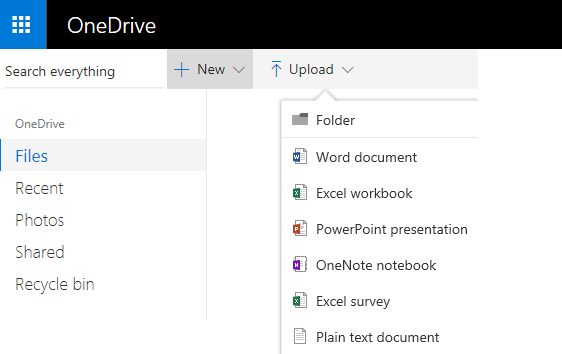
You can also create a document right from OneDrive by clicking New and then the name of the type of document you want to create.
Tip: To sign in to OneDrive, you need a Microsoft account. If you don’t already have one, click the Sign up now link at the OneDrive sign-in page and fill out the form. Your sign-in will be the email address and password that you set up in the form.
More information in this article
Save documents to OneDrive from Office programs
If you have a recent version of Office, you can save documents directly to OneDrive from your Office program. That eliminates the extra step of saving on your computer, then uploading.
In the Office 2013 or Office 2016
Go to File > Save As, and then pick OneDrive to save documents directly from programs like Word, Excel, and PowerPoint.
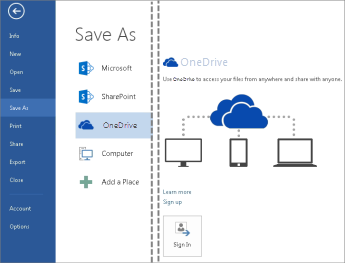
For detailed steps, see Save documents online.
In Office 2010
In Word, Excel, or PowerPoint
-
Open an existing document or create a new one in Word, Excel, or PowerPoint.
-
Click File, click Save & Send, and then click Save to Web.
Click Sign in. enter your email address and password, and then click OK. If you use Hotmail, Messenger, or Xbox Live, you already have a Microsoft account. If you don’t have one, click Sign Up to create a new Microsoft account.
Select a folder on your OneDrive, and then click Save As. Type a name for your file and then click Save. The document is now saved on OneDrive. Click File and Close.
-
In your web browser, go to OneDrive.com.
-
Select the folder where you saved your document, and then click the file name. The document opens in the appropriate Microsoft 365 for the web program.
In OneNote
-
Open an existing notebook or create a new one.
-
Click the File tab, and then click Share.
-
Click the notebook you want to save.
-
Click Web.
Note: If the notebook is not in the OneNote 2010 file format, OneNote prompts you to upgrade it. Click Upgrade, and then in the Notebook Properties dialog box click Convert to 2010. Click OK at the prompt that warns you that users of an earlier version of OneNote will not be able to share the notebook. Anyone with an earlier version of OneNote is able to share the notebook by using OneNote for the web.
-
Click Sign In, enter your email address and password, and then click OK.
-
If you use Hotmail, Messenger, or Xbox Live, you already have a Microsoft account. If you don't have one, click Sign up for Microsoft OneDrive to create a new Microsoft account.
-
Select a folder on your OneDrive, and then click Share Notebook.
-
In your web browser, go to OneDrive.com.
-
Select the folder where you saved your notebook, and then click it. The notebook opens in OneNote for the web.
Create new documents in your browser
-
Go to Office.com.
-
Click a program tile to start an Microsoft 365 for the web program, such as Word for the web.
-
If you're not already signed in, Sign in or create a Microsoft account.
-
Choose a template to start from, such as New blank document.
Work with Word documents
View your club newsletter in the browser
Distributing your organization’s newsletter is as simple as saving it on your OneDrive and sending a link.
-
Go to where the document is stored on your OneDrive, by following a link or by signing in at OneDrive.com.
-
Click the document.
Word for the web opens the document opens in Reading view. -
Click Share to invite individuals or get a link you can post or send to your friends.
Make a last-minute change
You’re the newsletter editor. The newsletter is finished, and you’ve saved it on OneDrive, ready to share. One last look, and you notice you misspelled a board member’s name. That’s quick and easy to update in the browser.
-
Click on the document to open it. Word for the web will automatically open to Editing view.
-
If you want to make changes beyond what you can do in the browser, click Open in Word.
In Word, when you save the document, it is saved back on OneDrive.
Note: In OneDrive, multiple authors can edit a document at the same time in Word for the web. For more information, see Work together on a document in Word for the web.
Print from the browser
The document that you print from the browser looks the same as it would if you printed it from Word.
With the document open in Word for the web, click File > Print, and then click Print again. A printable PDF is generated. Open it by clicking Click here to view the PDF of your document, and then follow the procedure you normally do for opening and printing PDF files from your browser.
More information
For more information about using Word for the web see Basic tasks in Word for the web.
Work with Excel workbooks
Make decisions based on live data
Gathering information in an Excel workbook helps you compare items so you can make informed choices. For example, you could reserve the picnic area for your party for free, but maybe it’s worth the expense of renting an indoor venue in rainy weather. By tracking information in an Excel workbook on your OneDrive, you can open the workbook in your browser anytime and slice your data in different ways to make decisions.
-
Go to where the workbook is stored on your OneDrive, by following a link or by signing in at OneDrive.com.
-
Click the workbook.
Excel for the web opens the workbook. -
Use the ribbon interface to view and interact with the data. Sort and filter rows or columns, expand PivotTables, and refresh the data.
Edit a spreadsheet in the browser
You just found out that the local movie theater is available to rent for private events. You want to add this information to your list of venues. When you edit in the browser, you can change data, enter or edit formulas, and apply basic formatting within the spreadsheet.
-
Click on the workbook to open it in Excel for the web. Excel for the web opens in Editing view.
-
Update the data, add formulas, insert charts, or apply formatting.
Excel for the web saves your changes automatically. -
If you want to make changes beyond what you can do in the browser, click Open in Excel.
In Excel, when you save the workbook, it is saved back on OneDrive.
Work together at the same time on a spreadsheet
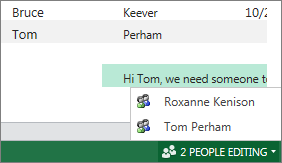
You’re not the only one researching event venues. What if your friend wants to add information to the spreadsheet at the same time you’re working in the workbook? In Excel for the web you can collaborate with other people on the same workbook at the same time. Go ahead and make your changes. Excel for the web indicates if other people are also working in the workbook.
Print from the browser
-
If you want to print a range of cells instead of the entire worksheet, select the cells.
-
On the File tab, click Print.
-
If popups are blocked, unblock them, at least for now. Then repeat steps 1 and 2.
Excel for the web opens a view suitable for printing in a new browser tab or window. -
If you selected a range of cells, but you want to print the whole worksheet instead, click Entire Sheet.
-
Click Print.
More information
For more information about using Excel for the web see Basic tasks in Excel for the web.
Work with PowerPoint presentations
Use your browser to view or present a slide show
It’s your turn to present the slide show for class, but you forgot to bring your laptop computer. You borrow someone else’s, but they don’t have PowerPoint installed. That’s okay: sign in to OneDrive, open the slide show in PowerPoint for the web, and present the slide show.
-
Go to where the presentation is stored on your OneDrive, by following a link or by signing in at OneDrive.com.
-
Click the presentation. PowerPoint for the web opens the presentation in Editing view.
-
Click the arrow buttons at the bottom of the display to step through the sides, or click Start Slide Show to play the slide show in in full-screen view.
Quickly add some slides
If your classmates want you to add some slides to the group presentation, you can quickly do that in your browser.
-
With the presentation open in PowerPoint for the web in Reading view, click Edit Presentation, and then click Edit in PowerPoint for the web.
PowerPoint for the web switches to Editing view. -
Click New Slide, and edit content as you want.
PowerPoint for the web saves your changes automatically. -
If you want to make changes beyond what you can do in the browser, click the File tab, and then click Open in PowerPoint.
In PowerPoint, when you save the presentation, it is saved back on OneDrive.
Print from the browser
You might want to print the slides as handouts to share with the class. Click the File tab, and then click Print and click Print again. A printable PDF is generated. Open it by clicking Click here to view the PDF of your document., and then follow the procedure you normally do for opening and printing PDF files from your browser.
More information
For more information about using PowerPoint for the web, see Basic tasks in PowerPoint for the web.
Work with OneNote Notebooks
Post notes for your friends or family
When you’re planning a group activity OneNote for the web gives your group a centralized place for collecting notes, brainstorming an idea, or assembling the bits into a more structured document, such as an itinerary you can share with your contacts as a Word document.
-
Go to where the notebook is stored on your OneDrive, by following a link or by signing in at OneDrive.com.
-
Click the notebook.
OneNote for the web opens the notebook in Editing view. -
Add notes to the current page, click a different page to edit, or add new pages or sections to the notebook in the navigation pane.
OneNote for the web saves your changes automatically. -
If you want to make changes beyond what you can do in the browser, click the File tab, and then click Open in OneNote (requires Microsoft OneNote 2010 or later).
In OneNote, the notebook is saved back on OneDrive.
Brainstorm together
Brainstorming loses steam if you have to take turns, waiting for one person to finish editing the notebook before you can add your ideas. By using OneNote for the web you can add your notes while other people are working in the notebook, even if some people have the notebook open in the OneNote desktop application.
Go ahead and make your changes. OneNote for the web lets you see who made which changes, and you can roll pages back to an earlier version if someone made changes that you don’t want.
-
To keep track of who is contributing which pieces of content, click the View tab, and then click Show Authors.
-
To view an earlier version of a page, click Page Versions on the View tab, and then click the time stamp for the version that you want to see.
More information
For more information about using OneNote for the web see Basic tasks in OneNote for the web.
Mobile device access
We recommend using the new Microsoft 365 mobile app. You can also find them in the Apple App Store or the Google Play store.
More information
For more information about using your cellular phone to view Word and PowerPoint files in Microsoft 365 for the web see Which browsers work with Office for the web.








